Content

Fix YouTube No Quality Option/Settings

Sunday, March 30, 2014 0 comments
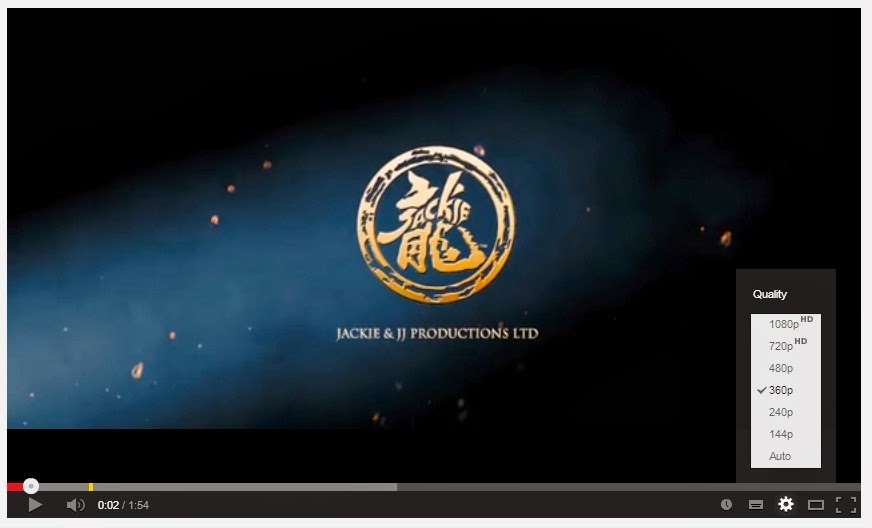
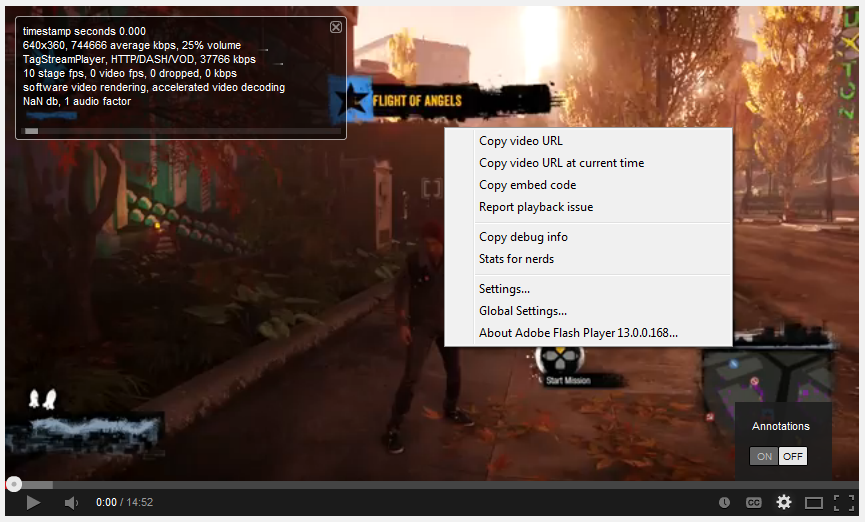
I'm having a problem with the YouTube player on Google Chrome that some videos play on the lowest quality. I clicked the Gear Icon settings but it only shows the Annotation. I refreshed the website but it doesn't fixed. I tried to play it on Incognito and Firefox and the player is just fine.
Image credit Nx64
The problem only exist on Google Chrome so I look for a solution. Luckily, I found a solution on this problem or maybe a YouTube bug. Make sure you logged out your account and all YouTube tabs are closed.

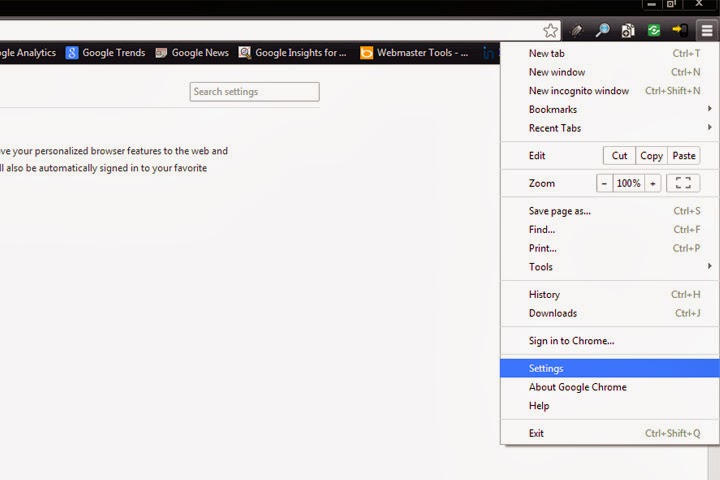
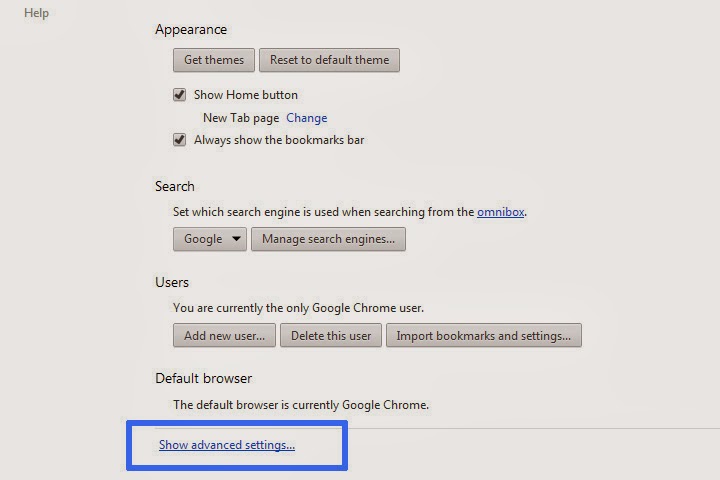
Go to Google Chrome settings and click Show Advanced Settings.

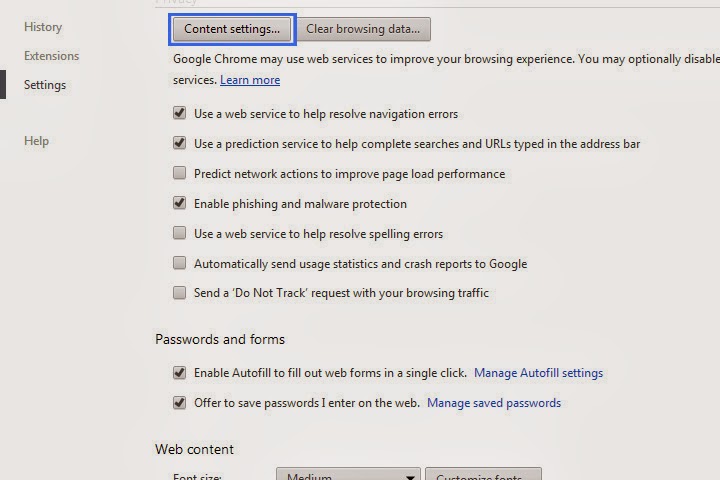
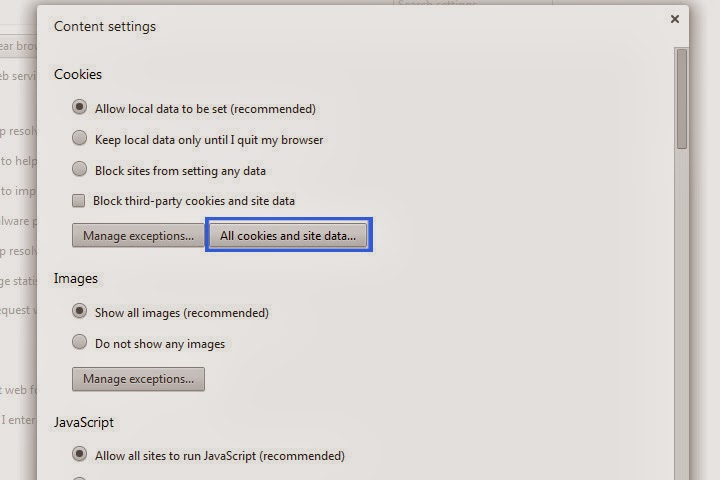
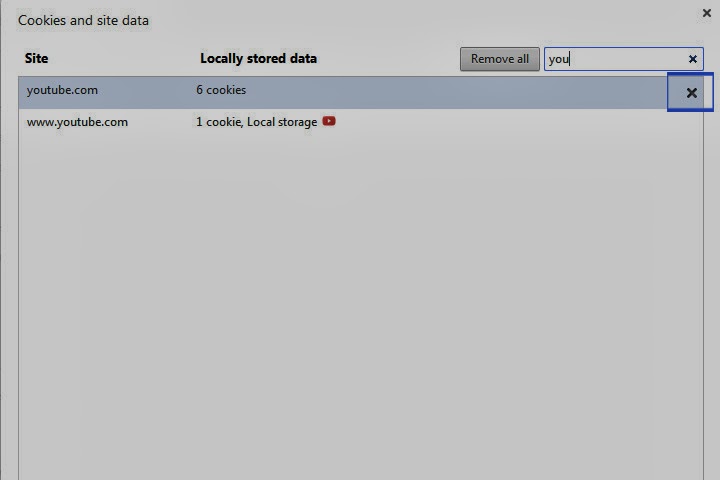
On Privacy, click Content settings button then click All cookies and site data.

Search for YouTube and delete all of its cookies/data by clicking the 'X' icon.
Now you have the Quality Settings/Options back and the problem has been fixed.
This problem may not only exist on Google Chrome, some may experience it on other browsers. Enjoy watching YouTube videos!

Browsers not showing images - Windows 7

Thursday, September 19, 2013 0 comments
There was a problem with my computer that I didn't experience in my laptop. I was struggling with this annoying thing where some images are not showing or displaying in any web browser, like the image on the left. I hate that when a web page stops loading and you see there are other things that need to be loaded and you're not contented of what you're seeing. I mean, it's like "uhh, is that all?," then you keep on refreshing the page but it still gives you the same result, no image, some plugins or ads are not showing.

It will ruin your day especially if you're a Publisher or Affiliate Marketer and you're placing ads on your websites then boom! it doesn't appear. It took me like three hours to solve this problem. I've read lots of solutions but it didn't work. Then I read this one solution by trying to check the Windows hosts file if there are some unnecessary texts. I also found that I have an application named SafeIP, free web proxy, and I'm sure it was the cause of my problem.

I checked my hosts file and saw lots of IPs and I didn't remember what is written in there. I deleted it quickly and did not make a backup. That's the other problem, I can't show you what is written in that file. But there is this words that I remember #SafeIP# and ends in #SafeIP Malware#.

Well, I don't think it is a malware, because you know malware with a hashtag, who believes in that. The thing is, I just solved my problem. For those who are unfamiliar with hosts file, it is located here "C:\Windows\System32\drivers\etc".

If the problem only exists in one of your browsers, you can try clearing your browser history, cache and cookies. For Mozilla Firefox and Google Chrome users, just press Ctrl+Shift+Del and check everything you see. Don't ask me about Internet Explorer.

Solution 2: Update Java and Flash.

Solution 3: Go to Control Panel > Network and Internet > Internet Options > Advanced tab. Scroll down to Multimedia and check Show pictures.

That's all I got for now. If you found another solution, please let me know.
How to: Copy DotA 2 folder to another PC

Monday, May 13, 2013 22 comments
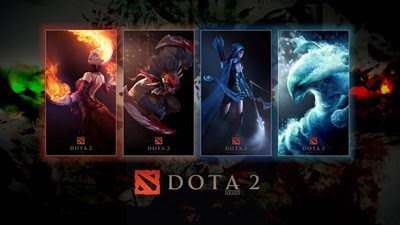
Are you having trouble transferring all the DotA 2 files from one PC to another? Follow these few simple steps to run DotA 2 in another computer.

- Copy the "dota 2 beta" folder from "C:\\Program Files\Steam\SteamApps\common". If you are using Microsoft Windows 64-bit OS, the files may be found here "C:\\Program Files(x86)\Steam\SteamApps\common". If it's installed in another partition of the hard driver, try searching for this location "(Local Disk Letter):\\Steam\SteamApps\common".

- Download and install Steam HERE. After installing, go to "Steam\SteamApps\" and you will see there is no "common" folder. You may create a new one or do this simple trick; Run Steam application and install any game you want. You will see the game starts downloading from your Library. Right click on it and Pause Download, then right click again and delete local contents. Go back to "Steam\SteamApps\" folder and "common" folder should be already there.

- Exit Steam application and paste the "dota 2 beta" folder to "Steam\SteamApps\common\". Run Steam application again and click Library. You will see DotA 2 is not installed in your machine. (If you haven't seen Dota 2 in there, ask one of your friends to send you an invite.) Right click DotA 2 and click install. Let Steam discover all the files from your hard drive. And DONE! You can now play DotA 2 with your friends.

UPDATE: DOTA 2 has finally launched after a two year beta with Abaddon, also known as Lord of Avernus, included in its recent update. Since the game has officially released, the following steps above probably won't work due to the changes in the game itself and the update from Steam. But this another tweak may help you to move your DOTA 2 files to another computer.

- Open Steam application. Click Steam > Backup and Restore Games.
- Select the game you want to backup.
- Select a location/directory where you want to save your backup files and click continue.
- Wait until it completely back up your files.

- On the other computer, launched Steam application (download/install if it doesn't have). Click Steam > Backup and Restore Games. Then click "Restore a previous backup." Select a location and wait until the process is complete. Hope this will help.

HTC Wildfire Froyo 2.2 Root to Android 2.3.3 Gingerbread

Monday, July 4, 2011 1 comments
I have an HTC Wildfire running Android 2.2 Froyo. It is a budget friendly Android phone. It has a great user interface and fun to use. 

Unlike the previous version of Android (Eclair 2.1), Froyo allows you to install applications on SD card or move your 'installed' apps to SD manually to freeup space. The problem is, if you update your phone to Froyo 2.2, you'll get an S-On (Security Flag) in your device. In this case, you're unable to root your device.

After a week of searching, I've found an easy way on how to get it rooted. The first thing you should do is BACKUP YOUR FILES. WARNING: Rooting the HTC Wildfire will void the warranty. Just follow the instructions below and have your phone rooted in less than 30 minutes.

S-Off using AlphaRevX:
1. Go to this website http://alpharev.nl/x/beta/ and download the Microsoft Windows version.
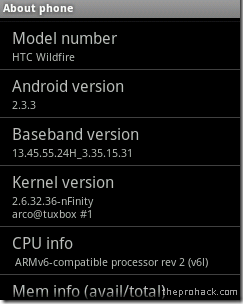
2. It will ask for a serial, enter your phone's serial number. "Go to Settings > About Phone." Then copy the code given.
3. Enable USB Debugging. "Settings > Application > Development."
4. Install the HTC Driver. Mine is in the SD card came with the phone.
5. Now extract and run the alpharevx.exe. Enter the code given earlier and connect your phone. It should detect your phone and display USB Debugging mode.
6. Once it's completed, you can remove your phone.
7. Turn off your phone, then press volume down + power button. It should display AlphaRevX and S-Off on top of it.

Installing Clockwork Recovery:
1. Download the file PC49IMG.zipDOWNLOAD
2. Format your SD card to FAT 32 and add the downloaded file.
3. Go into HBoot Mode by pressing volume down + power. It will ask you to update firmware, press Volume UP to select YES. When it's done, Boot into Normal Boot, delete the PC49IMG.zip.
4. Download su-2.3.6.1-ef-signed.zipDOWNLOAD
5. Go to HBoot again and select Recovery
6. Click install zip from SD card > Choose zip from SD card. Then locate the su-2.3.6.1-ef-signed.zip and let it install. DONE! Your phone is rooted!

Flashing CyanogenMod:
1. Download the latest CyanogenMod version HERE and Google Apps HERE, add to SD card. 
2. ReBoot your phone to Recovery by pressing Volume Down + Power Button.
3. Click install zip from SD card > Choose zip from SD card. Locate 'update-cm-7.0.3-buzz-signed.zip.'
4. Let it update. Mine takes less than 10 minutes.
5. Click install zip from SD card > Choose zip from SD card. Then locate 'gapps-gb-20110613-signed.zip' and install it.
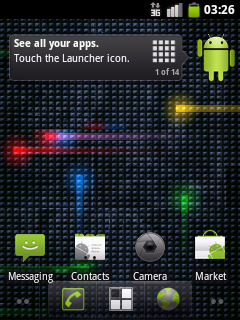
6. Once done, ReBoot into Normal Boot. Your phone should now boot into CyanogenMod. Enjoy Android 2.3.3 Gingerbread!!!

You can also use the instructions above in other Android phones. Go to CyanogenMod Wiki for the complete information and lists of supported devices.

Apple's iPad 2: What to expect

Wednesday, March 2, 2011 0 comments

It's been exactly six months since my last post and I realized that I need to update this blog. I just remember that Apple will have an announcement about its second-gen slate. I'm not an Apple fan-boy, I just want to update my blog, sorry Apple users.

Apple is finally ready to roll out its next-generation slate. The iPad 2 Announcement is set for March 2, 2011, Wednesday. The first-gen iPad actually looks quite good (not bad at all), but it would have been better with Flash and Camera. Apple event on Wednesday will take place in San Francisco's Yerba Buena Center for the Arts.

What we expect from Apple's latest tablet? We all know that Apple's iPad 2 will compete with rival companies such as Motorola (Motorola Xoom) and Research in Motion (BlackBerry Playbook). I'm expecting a lighter and thinner iPad with a front-facing camera, possibly a mini-USB port and Intel's brand-new connection technology called Thunderbolt, also known as Light Peak.

Apple Event Live Video Channel here: CHANNEL 1. That's all for today. Thanks for reading.

BlackBerry OS 6.0 in Q3 2010

Saturday, September 25, 2010 0 comments
After the Blackberry OS 5, Research In Motion Ltd. announced the new BlackBerry OS 6.0. RIM's new operating system for BlackBerry smartphones will be released in the 3rd quarter this year. The BlackBerry 6 features a new web browsers and new user interface. Research In Motion Co-CEO Mike Lazaridis said, it has more media capabilities and tabbed browsing for access to multiple web pages at the same time.

The latest BlackBerry OS 6.0 is now available for BlackBerry Torch 9800. According to the report, It is also available for Bold 9700, Bold 9650 and Pearl 3G in third quarter of the year 2010. It has been said that, BlackBerry 6 will come both in QWERTY and touchscreen devices. Still, no official reports or updates for BlackBerry Storm 2 9550. Here is the Sneak Peek for RIM's BlackBerry OS 6.0.


Intel Unveils Core i9: 6-core CPU

Tuesday, March 2, 2010 1 comments
The high-end consumer and business microprocessors will reveal a new six cores of speed CPU. After the series of Celeron, Pentium and other Core processors, the Intel will unveil it's new creation, the Intel Core i9. Intel's upcoming processor codenamed Gulftown. It is a 6-core chip with 32-nanometer processor. The Intel Core i9 performs up to 50% faster than Intel's current Core i7 chip and a 50% increase in L3 cache at 12 MB.

Avast! Professional Edition

Tuesday, August 4, 2009 0 comments
Everyone needs a protection for their computers or laptops against viruses, malwares and spywares. I used Avast! Professional Edition for almost 1 year for my computer protection. Once you dowload a file, it automatically scan it while downloading. If the file has a virus, it will force you to abort downloading the file. Avast! Pro also gives you an internet security, it can block all the malicious websites.

Avast! Professional Edition - an anti-virus software has a complete virus protection and other forms of malware with built-in anti-spyware detection and with full desktop security including resident shield. Avast! also include daily automatic updates to ensure against all types of spyware and malware.

Avast! Professional Edition is available to download only for 60 days free trial but i will give you a Serial Key(s) for you to be able to use for a long time.

Download Avast! Professional Edition HERE...

Download Avast! Professional Edition Serial Key(s) HERE...

Magic: The Gathering

Monday, July 20, 2009 0 comments
Magic: The Gathering is a collectible card game and played by two or more players. Build your own deck of cards by choosing among five colors or mana . The game starts with 20 life points for each player. You will lose the game if your life points reduced to zero. You can use your imagination while playing. The gameplay is to summon creatures, casting spells and sometimes you need to sacrifice your creature to cast some spells.

The Planeswalkers, it is the most powerful mage and able to travels across the planes of existence, they can't attack or block. There are about 12 Planeswalkers in Magic: The Gathering. The Planeswalkers were originally released in the expansion set of Lorwyn, along with type 2 cards.

I start playing Magic: The Gathering last year. Ciro, the drummer of Reklamo band, is the one who teach me how to play and build my first deck of magic cards which costs Php100.00. I used two mana, forest (green) and swamp (black). My second and last deck is Elves, much expensive than the first one. Some said that Elves deck is for the rich players at that time. I don't know why but I think the price of the cards you need to buy to build this kind of deck. Few months later, I stopped playing and decided to sell my Elves deck for Php700.00.

Privacy Policy

Sunday, July 19, 2009 0 comments
If you require any more information or have any questions about our privacy policy, please feel free to contact us by email at thogz11@hotmail.com.

At i-togodoinkz.blogspot.com, the privacy of our visitors is of extreme importance to us. This privacy policy document outlines the types of personal information is received and collected by i-togodoinkz.blogspot.com and how it is used.

Log Files
Like many other Web sites, i-togodoinkz.blogspot.com makes use of log files. The information inside the log files includes Internet Protocol ( IP ) addresses, type of browser, Internet Service Provider ( ISP ), date/time stamp, referring/exit pages, and number of clicks to analyze trends, administer the site, track user’s movement around the site, and gather demographic information. IP addresses, and other such information are not linked to any information that is personally identifiable.

Cookies and Web Beacons
i-togodoinkz.blogspot.com does not use cookies.

DoubleClick DART Cookie
.:: Google, as a third party vendor, uses cookies to serve ads on siraquarius.blogspot.com.
.:: Google's use of the DART cookie enables it to serve ads to users based on their visit to i-togodoinkz.blogspot.com and other sites on the Internet.
.:: Users may opt out of the use of the DART cookie by visiting the Google ad and content network privacy policy at the following URL - http://www.google.com/privacy_ads.html

Some of our advertising partners may use cookies and web beacons on our site. Our advertising partners include ....
Google Adsense
Adbrite
Chitika

These third-party ad servers or ad networks use technology to the advertisements and links that appear on i-togodoinkz.blogspot.com send directly to your browsers. They automatically receive your IP address when this occurs. Other technologies ( such as cookies, JavaScript, or Web Beacons ) may also be used by the third-party ad networks to measure the effectiveness of their advertisements and / or to personalize the advertising content that you see.

i-togodoinkz.blogspot.com has no access to or control over these cookies that are used by third-party advertisers.

You should consult the respective privacy policies of these third-party ad servers for more detailed information on their practices as well as for instructions about how to opt-out of certain practices. i-togodoinkz.blogspot.com's privacy policy does not apply to, and we cannot control the activities of, such other advertisers or web sites.

If you wish to disable cookies, you may do so through your individual browser options. More detailed information about cookie management with specific web browsers can be found at the browsers' respective websites.